
Guide
Hytale Server Hosting Costs: What to Expect
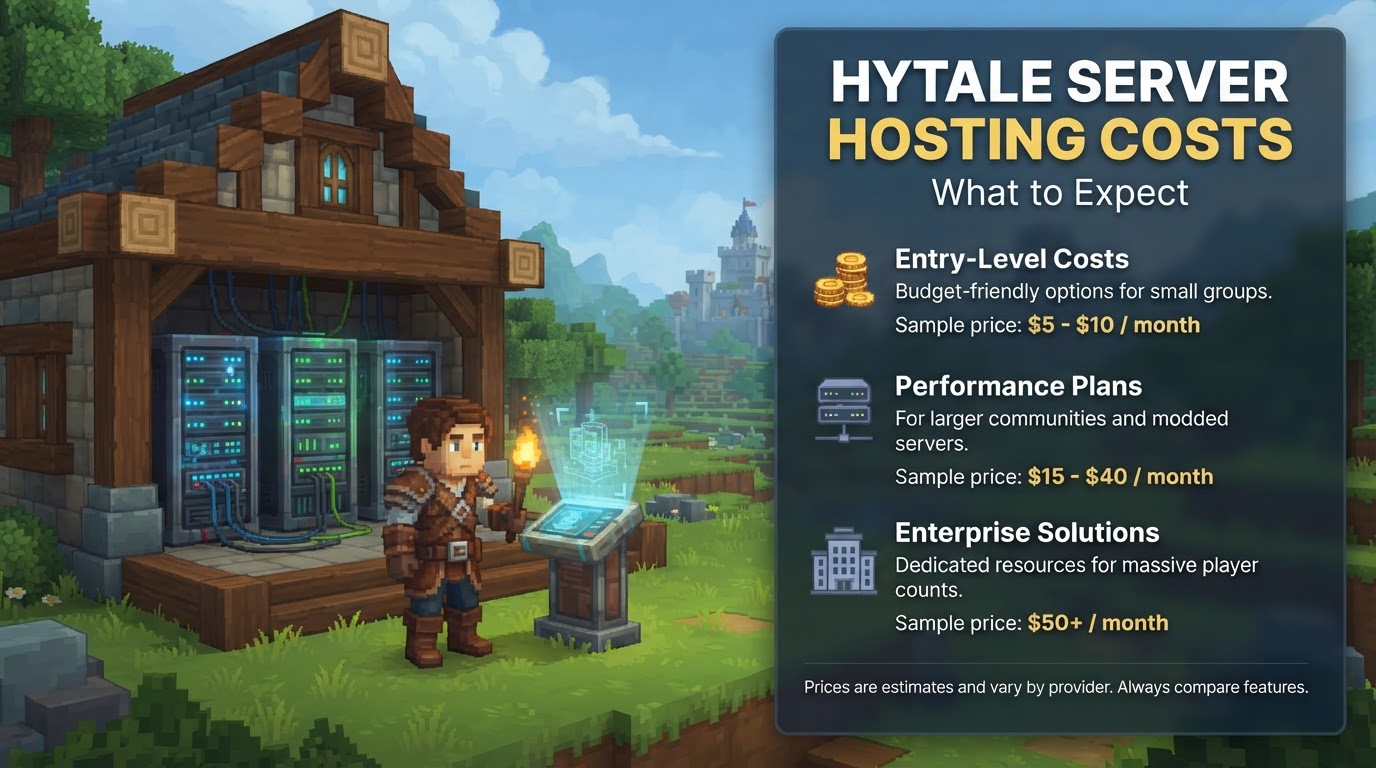
Hytale server hosting costs can vary significantly, ranging from under $10 per month for small, basic servers to over $150 per month for large, heavily modded communities requiring dedicated resources. The primary drivers of this cost include the number of players, the amount of RAM and CPU required, the type of storage, and the specific hosting provider chosen. As Hytale officially entered early access on January 13, 2026, concrete information regarding server hosting is now available, allowing for more precise expectations.
Mechanics Influencing Hytale Server Hosting Costs
Understanding the core components that dictate a server’s performance and, consequently, its price is crucial for making an informed decision.
RAM (Memory)
- Official Minimum: Hytale officially recommends a minimum of 4GB of RAM for a server.
- Practical Minimum: For a stable experience with a small group (4-8 players), 6GB of RAM is strongly suggested to prevent frequent crashes or performance bottlenecks as the world loads more chunks and players interact.
- Scaling Needs: More players, complex builds, and especially custom content or mods will necessitate increased RAM.
- For approximately 10 players, 8-10GB of RAM is a good recommendation.
- For 25+ players, 24GB or more may be required, particularly for public servers or those with extensive modding.
- RAM is often the primary factor driving the cost of a hosting plan.
CPU (Processor)
- While the total core count of a CPU contributes to overall system performance, Hytale game servers, like many sandbox titles, often rely heavily on strong single-thread performance for processing world updates, player actions, and game logic.
- A powerful CPU with high clock speeds per core is more crucial for a smooth, lag-free experience, especially as player counts rise and the server processes more simultaneous events.
Storage
- Type: Solid State Drives (SSDs), and particularly NVMe SSDs, are highly recommended. They offer significantly faster read/write speeds compared to traditional Hard Disk Drives (HDDs). This translates to quicker world loading, faster autosaves, and more rapid restoration processes, improving overall server responsiveness.
- Amount: The amount of storage needed depends on the size of your world, the number of backups you wish to keep, and any additional files for mods or custom content.
Player Slots
- Many hosting providers price their plans based on the number of player slots advertised. This often bundles a specific amount of RAM and CPU suitable for that player count.
- However, it’s important to remember that actual resource consumption is more directly driven by the complexity of the game world, player activity, and installed mods, rather than just the raw player count.
Bandwidth
- Sufficient network bandwidth is essential for stable connections for all players and to prevent latency issues (lag), especially on servers with a larger player base or those experiencing high data traffic.
Server Location
- Choosing a server location that is geographically close to the majority of your player base is critical. Proximity minimizes latency (ping), resulting in a smoother and more enjoyable gameplay experience for everyone.
Modding and Customization
- Hytale is designed with extensive modding support, including in-game scripting and custom content creation. Heavily modded servers will invariably require more resources (RAM, CPU, and potentially storage) than vanilla servers, directly increasing hosting costs.
DDoS Protection
- Distributed Denial of Service (DDoS) protection is a crucial security feature that defends your server against malicious attacks designed to overwhelm it and take it offline. Many reputable hosts include this as a standard feature, which is vital for maintaining server stability and uptime.
Hosting Type
- Managed Game Hosting: This is the most common and user-friendly option. A provider handles all hardware, initial setup, operating system management, and often offers a custom control panel for easy server administration.
- Costs: Typically ranges from $5-$60+ per month.
- Cloud VPS (Virtual Private Server): Offers more control and flexibility than managed hosting, as you get root access to a virtual machine. However, it requires more technical knowledge to manage the operating system, security updates, and server software yourself.
- Costs: Typically ranges from $10-$60+ per month, depending on resources.
- Dedicated Server: Provides exclusive use of an entire physical machine. This offers maximum performance, isolation, and customization, making it ideal for very large communities or those with highly specific requirements. It comes with the highest costs and administrative workload.
- Costs: Typically ranges from $50-$200+ per month.
- Self-Hosting: Running a Hytale server on your own personal computer or dedicated hardware at home. While it eliminates monthly hosting fees, it involves significant initial investment and ongoing operational costs.
- Initial Hardware Costs: $400-$750+ for a suitable machine.
- Ongoing Costs: Electricity bills ($156-$360 annually based on average consumption and rates), potentially upgraded internet service, and a static IP address.
- Technical Effort: Requires significant time and technical expertise for setup, maintenance, troubleshooting, and configuring network settings like port forwarding (Hytale uses UDP port 5520 by default) and firewall rules.
Estimated Hytale Server Hosting Costs (Current as of late 2026)
Based on current providers and comparisons to hosting for similar games, here’s what you can expect:
- Small Private Server (4-8 players, light/no mods): Expect to pay $10 – $20 per month. For example, some providers offer plans like 4 players with 5GB RAM for around $12.50/month.
- Medium Server (10-25 players, some mods): Costs are likely $20 – $50 per month. This tier typically includes 8GB to 16GB of RAM to handle increased player load and moderate modding.
- Large Public/Heavily Modded Server (25+ players): Expect $50 – $150+ per month. This level often necessitates a dedicated server or a high-end VPS with 24GB+ RAM and a strong, high-performance CPU.
- Self-Hosting: An initial hardware investment of $400-$750, plus estimated annual electricity costs of $156-$360, and potential additional costs for upgraded internet or a static IP.
Exact Steps for Setting Up Managed Hytale Hosting
For most users, managed game hosting is the simplest and most recommended option. Here’s a general step-by-step guide:
- Choose a Hosting Provider: Research and select a reputable provider that specifically offers Hytale server hosting. Look for hosts that are “Officially Hytale Verified” or have demonstrated early access to server files and strong support for the game. Examples include Shockbyte, GPORTAL, and BisectHosting.
- Select a Plan: Based on your anticipated player count, desired modding level, and budget, choose a plan with adequate RAM and CPU. Remember the practical minimum of 6GB RAM for small groups, even if the official minimum is 4GB.
- Choose Server Location: Select a data center location that is geographically closest to the majority of your intended player base to ensure the lowest possible latency and best gameplay experience.
- Complete Purchase: Proceed with the payment process. Many providers offer instant setup, meaning your server will be provisioned and ready within minutes of purchase.
- Access Control Panel: Once your purchase is complete, you will receive login details for a web-based control panel (e.g., Multicraft, TCAdmin, or a custom panel). This is where you will manage all aspects of your Hytale server.
- Configure Server:
- Install Hytale: For most managed hosts, Hytale will be pre-installed or easily installable with a single click through the control panel.
- Set Server Name/Settings: Use the control panel to customize your server’s name, set the game mode, difficulty, world seed, and other essential settings.
- Whitelist/Blacklist Players (Optional): If you want a private server, configure a whitelist to allow only specific players to join.
- Install Mods/Plugins (Optional): Hytale supports built-in modding tools and scripting. Follow your host’s specific instructions for uploading and installing custom content, mods, or server-side scripts.
- Share IP Address: Once configured, provide your server’s IP address and port number to your friends or community members so they can connect and join your Hytale world.
Tips for Cost Management and Optimization
- Prioritize RAM and Single-Core CPU: These are the most critical hardware specifications for Hytale server performance. Don’t skimp on these.
- Start Small and Scale Up: Begin with a plan that comfortably supports your initial player count and modding intentions. Most reputable providers allow you to upgrade your plan seamlessly as your community grows without losing your world data.
- Monitor Resource Usage: Regularly check your server’s RAM and CPU usage through your control panel. If your server is frequently hitting its limits, it’s a clear indicator that an upgrade or optimization is needed.
- Compare Providers Carefully: Look beyond just the headline price. Investigate what’s included in the package (e.g., DDoS protection, automatic backups, 24/7 support) and read reviews from other users.
- Consider Annual Billing: Many hosting companies offer discounts for committing to longer billing cycles (e.g., quarterly, semi-annually, or annually).
- Leverage Free Trials: If available, use free trials to test the performance and reliability of a host before committing to a paid plan.
- Optimize Your World: While Hytale’s engine is efficient, minimizing unnecessary chunk loading, overly complex in-game contraptions (if applicable to Hytale’s mechanics), or excessive entities can reduce resource strain and improve performance.
Common Mistakes to Avoid
- Underestimating RAM Requirements: Relying solely on the absolute minimum (4GB) often leads to server instability and crashes, especially with multiple players. Always opt for at least 6GB for a stable experience with small groups.
- Ignoring CPU Performance: Focusing exclusively on RAM and neglecting the importance of a strong single-core CPU can result in noticeable lag, even if you have ample memory.
- Choosing the Cheapest Host Without Research: Very low prices can sometimes indicate oversold servers, poor infrastructure, unreliable support, or hidden fees that will increase your total cost later.
- Not Considering Server Location: Hosting your server far from the majority of your players will inevitably lead to high ping and a frustrating gameplay experience for them.
- Failing to Back Up Your World: Even if your host offers automatic backups, always ensure your world data is regularly backed up. Data loss can be devastating.
- Incorrect Port Forwarding (for self-hosting): If you choose to self-host, incorrectly configuring port forwarding (specifically UDP port 5520 for Hytale) and firewall rules will prevent external players from connecting to your server.
- Overlooking Ongoing Costs for Self-Hosting: The “free” aspect of self-hosting often fails to account for the significant electricity bills, potential internet upgrade costs, and the substantial time commitment required for maintenance and troubleshooting.
Uncertainty Flags
As Hytale is still in early access, some aspects of server hosting may evolve:
- Long-term Pricing Stability: Server hosting prices may fluctuate as the game matures, its resource demands become even clearer, and the hosting market adapts.
- Specific Mod Resource Impact: While modding is a core feature, the exact resource impact of future, highly complex mods is yet to be fully determined, which could influence future hosting requirements and associated costs.
- Hypixel Studios’ Own Hosting Plans: While third-party hosting is fully supported, any future first-party hosting solutions offered directly by Hypixel Studios could introduce new pricing models or competitive options.